Global Medical Technology Intelligence Hub

Can a medical device interoperability platform connect legacy devices?





Yes. A medical device interoperability platform can often connect legacy devices, provided there is a usable way to access their data and a supported path to the receiving system. That path may involve a serial connection, a network interface, an existing departmental system, or a gateway that translates an older protocol into a format the destination can accept.
Connectivity alone, however, does not establish that the data is suitable for clinical use. A successful evaluation must also establish which measurements are available, how they are identified and timestamped, whether they reach the right patient record, and what happens when a connection fails. Some older devices can provide useful results but cannot support continuous monitoring, remote configuration, or two-way communication.
Start with the device and the intended use
Before comparing platforms, define the workflow the connection must support. Sending a laboratory result to a laboratory information system is different from displaying near-real-time vital signs in an electronic health record (EHR). The acceptable delay, required data fields, patient identification method, and consequences of missing data may be different in each case.
For every device or device family in scope, document the manufacturer, model, software version, installed options, and location. Devices that look identical may have different interface capabilities or output settings. Include the system currently receiving the data, if any: an analyzer may already send results to a departmental application, making that application a more practical integration point than the device itself.
Then establish what the proposed workflow actually needs. A simple numeric result may be insufficient without its unit, reference context, status, and collection or observation time. For imaging equipment, the required output might be an image and associated study information rather than a measurement. A platform that connects to the device but cannot carry the necessary context does not meet the use case.
Which connection options are realistic?
Legacy integration usually falls into a few patterns. The most suitable one depends on the available interface and the clinical or operational purpose of the data.
A gateway is often useful when a device has a serial output but cannot communicate directly with modern network systems. It can receive the device’s data and pass it through an integration service for transformation and delivery. The gateway does not, however, create information the device never sends. If the output contains a result but no patient identifier, another controlled workflow must establish the patient association.
Likewise, protocol conversion is not the same as clinical interpretation. A platform may convert a proprietary message into HL7 or expose data through a FHIR interface, but the receiving application still needs to understand what each field means. Support for a named standard is useful only when the platform and destination support the relevant messages, resources, fields, and workflow.
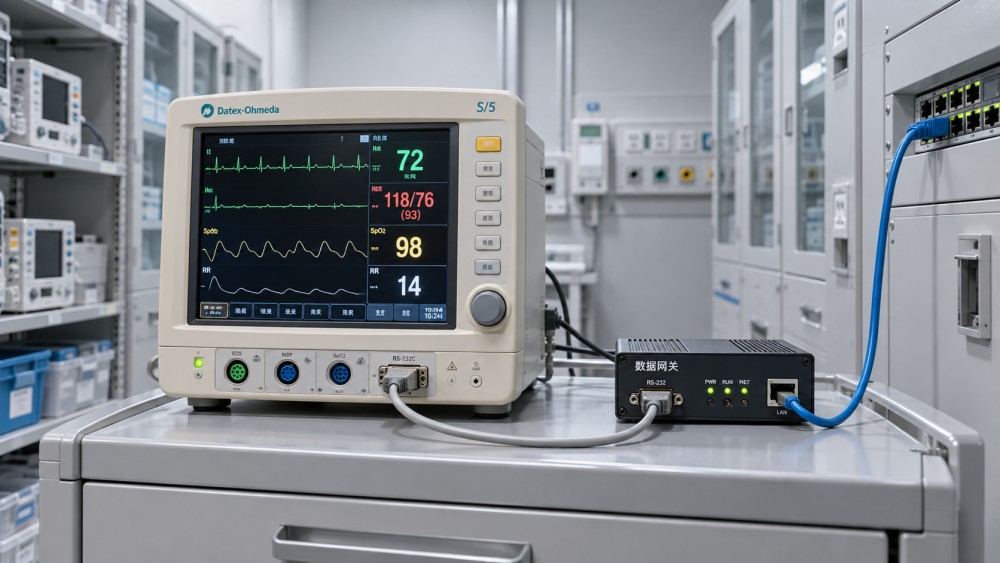
Where an existing system already aggregates device data, integrating at that level can reduce the number of individual device connections. The trade-off is that the intermediate system may filter, delay, or change the data. Examine what reaches the destination rather than assuming it matches the original device output.
What “compatible” should mean in a platform evaluation
A vendor’s device compatibility list is a starting point, not an acceptance test. Ask for the specific model, software version, interface option, connection method, and data elements covered by the proposed integration. Also distinguish between a connector that is already supported and one that requires custom development.
Request a sample data flow from the device to the intended destination. The evaluation should follow a representative observation through each stage: source output, gateway or connector, transformation, routing, and the final display or record. At each stage, check whether the original meaning remains intact.
Several details deserve particular attention:
- Measurements and units: Confirm which values are available, how units are represented, and whether conversions preserve the intended meaning. A label that looks familiar does not guarantee an equivalent measurement.
- Patient and encounter association: Establish how data is matched to the correct patient and encounter, including what happens during transfers, device reassignment, or an unidentified-patient workflow.
- Timestamps: Identify whether the displayed time represents collection, observation, transmission, or receipt. Device clocks, time zones, and delayed delivery can affect interpretation.
- Status and corrections: Determine whether preliminary, final, corrected, or invalid results can be distinguished where the workflow requires it.
- Device identity and provenance: Retain enough information to trace a result to its source device and integration path when investigating a discrepancy.
- Missing or repeated messages: Understand how the system detects gaps, handles retransmission, and prevents or identifies duplicates.
These checks become especially important when data supports clinical decisions. A connection intended only for equipment inventory or operational reporting may have different requirements, but its limitations should still be explicit. Do not assume that a feed suitable for retrospective reporting is also suitable for live patient monitoring.
One-way data transfer may be the right limit
Many legacy projects need observations to move from a device into another system; they do not need the receiving system to send commands back. One-way communication can be a practical choice when the device exposes an output interface but does not support authenticated control or a documented command interface.
Two-way integration introduces additional questions: which commands are supported, who can initiate them, how the device confirms execution, and what happens if the connection drops during an operation. The fact that a device has a network port does not mean remote control is available or appropriate. Any proposed control function needs to fit the manufacturer’s supported use, the organization’s safety process, and the intended clinical workflow.
Be equally precise about frequency. A platform may receive periodic exports, individual results after a test completes, or a continuous stream. None should be described simply as “real time” without defining the expected delivery behavior and testing it against the use case.
Plan security around the whole connection path
Older devices may lack modern authentication, encryption, or update capabilities. Adding an integration platform does not automatically remove those limitations. Evaluate the device, local connection, gateway, network, platform, and destination as one path, with clear responsibility for each component.
Possible safeguards include network segmentation, restricting connections to necessary endpoints, controlled physical access to gateways and ports, and monitoring for unexpected traffic. Where a gateway provides encrypted communication upstream, establish exactly where encryption begins and ends; traffic between the legacy device and gateway may have different protections.
Operational access matters too. Review how administrators authenticate, how privileges are assigned, what activity is logged, and how credentials are managed. Ask how the vendor handles security updates and vulnerability notifications, particularly when a device or operating system can no longer be patched. Compensating controls can reduce exposure, but their suitability depends on the device, environment, and risk assessment.
Privacy requirements should follow the data through the integration. A gateway that buffers patient data during an outage needs controls for stored data, access, retention, and disposal. The same applies to diagnostic logs and test messages, which can contain patient identifiers or clinical information.
Test failure behavior before committing to rollout
A demonstration with a connected device proves less than a controlled test of the intended workflow. Include representative device configurations and the actual destination environment, then agree on acceptance criteria with the clinical, biomedical engineering, IT, and application teams.
A useful pilot should cover normal data delivery and the conditions that interrupt it. Disconnect the network or gateway under controlled conditions, restore service, and observe whether data is queued, lost, resent, duplicated, or flagged for review. Check how operators learn that a feed has stopped and who is responsible for responding.
Test patient reassignment, device restart, clock changes, and any correction or cancellation workflow relevant to the device. Compare the destination record with the source output, including units, timestamps, identifiers, and status. For an imaging workflow, inspect the intended study and associated information in the receiving system; for a laboratory workflow, follow a representative result and any applicable status changes.
Agree on what happens when data cannot be delivered or matched. Depending on the workflow, a safe fallback might involve retaining the existing documentation process, holding messages for review, or reverting to a manual procedure. The fallback needs an owner and a way to reconcile records after service returns. A silent failure that leaves users believing data is complete is more concerning than an obvious interruption.
When replacement or a narrower scope makes more sense
Integration may be a poor investment when the device has no accessible data output, the required protocol is unavailable, or the only feasible interface cannot deliver the information needed for the workflow. Custom development can sometimes bridge a gap, but it also creates ongoing responsibility for testing, updates, documentation, and support when either endpoint changes.
The same calculation applies when security controls cannot reduce risk to an acceptable level, or when the device is approaching replacement for other reasons. In some cases, retaining a manual workflow for a small number of devices is more practical than building and maintaining a fragile connection. In others, replacing equipment may provide a more sustainable route to the required data and support.
Compare options using the full operating cost, not just the platform license: interfaces, gateways, implementation, testing, maintenance, monitoring, vendor support, and the work required when device configurations change. A lower-cost connector is not necessarily economical if each exception requires manual investigation.
Questions to put in the vendor evaluation
Ask prospective suppliers to answer against the specific devices and workflows in scope, rather than providing a generic interoperability statement:
- Which models, software versions, interface options, and data fields are supported today? Which elements require configuration or custom work?
- What hardware or software sits between each device and the destination, and who supplies, updates, and supports it?
- How are patient matching, timestamps, units, source identification, corrections, and duplicate messages handled?
- What happens during an outage, and what tools show missing, rejected, delayed, or unmatched messages?
- How are connections secured at each stage, including local device-to-gateway links and stored buffers?
- What changes trigger retesting, and who maintains the integration when a device, gateway, platform, or receiving application is updated?
The strongest proposal is one that can demonstrate the required data flow on representative equipment, make its limitations visible, and define how the connection will be supported after deployment. Start with a device and workflow where those conditions can be tested; expand only when the observed results meet the agreed clinical and operational requirements.
Got questions about this industry topic or seeking best practices for your business? Drop us a line below, and let the expert team at Indu Streamline help you out.
We respect your privacy. Your information is strictly confidential.
Related News
- Clinical Integration Solutions for Hospitals: Reducing Data Gaps and Workflow RiskJun 03, 2026Clinical integration solutions for hospitals help close data gaps, reduce workflow risk, and improve care coordination, compliance, and efficiency.
- Can a medical device interoperability platform connect legacy devices?Nov 01, 2026Can a medical device interoperability platform connect legacy devices? Explore integration options, security risks, and key questions to ask vendors.
- Smart Hospital Automation: Where to Automate First for Faster, Safer CareSep 09, 2026Smart hospitals automation: discover where to automate first to improve patient safety, workflow visibility, and operational efficiency for faster, safer care.
- Medical Equipment Applications by Function: A Practical Guide for Clinical PlanningAug 28, 2026Medical Equipment Applications by function: explore practical guidance for imaging, labs, sterilization, dental care, and resilient clinical planning.
Related News
- 00
0000-00
Medical Imaging Trends Shaping Diagnostic Investments in 2026 - 00
0000-00
Dental Laser Systems: When the Upgrade Delivers Real Clinical Value - 00
0000-00
Smart Hospitals Technology Trends Shaping Care Delivery in 2026 - 00
0000-00
Precision Medical Imaging in 2026: Performance Trends That Matter - 00
0000-00
Clinical Integration Solutions for Hospitals: Reducing Data Gaps and Workflow Risk
Author :
Strategic Hub Team
Weekly Insights
Stay ahead with our curated technology reports delivered every Monday.